

Smart bulbs look simple until you start shopping.
One box says Wi-Fi. Another says Matter. Another says Thread. Some need a bridge. Some say “no hub required.” Some work with Alexa and Google but not Apple Home. Others promise millions of colors even though all you really want is a warm lamp at night and a brighter white light in the morning.
The biggest mistake is treating all of those labels as if they describe the same thing.
They don’t.
This guide breaks down the smart-bulb terms that actually matter before you buy, including Wi-Fi vs. Thread, what Matter really means, when you need a hub or border router, how bright a bulb should be, and whether you need full color at all.
The Short Version: What Should You Check Before Buying a Smart Bulb?
- Socket and bulb shape: E26/A19, BR30, GU10 and other formats are not interchangeable.
- Brightness: compare lumens, not just watts or “60W equivalent.”
- White vs. tunable white vs. full color: don’t pay for RGB if you only want adjustable whites.
- Connection type: Wi-Fi, Thread, Zigbee/bridge or another protocol.
- Matter support: useful for cross-platform compatibility, but it does not automatically mean “no hub needed.”
- Your smart-home ecosystem: Apple Home, Google Home, Alexa, SmartThings or a mix.
- Your wall switch: smart bulbs generally need constant power to stay reachable.
- Existing dimmers: many smart bulbs are designed to dim electronically through the app rather than through a traditional wall dimmer.
If you check those things first, most of the marketing language becomes much easier to sort out.
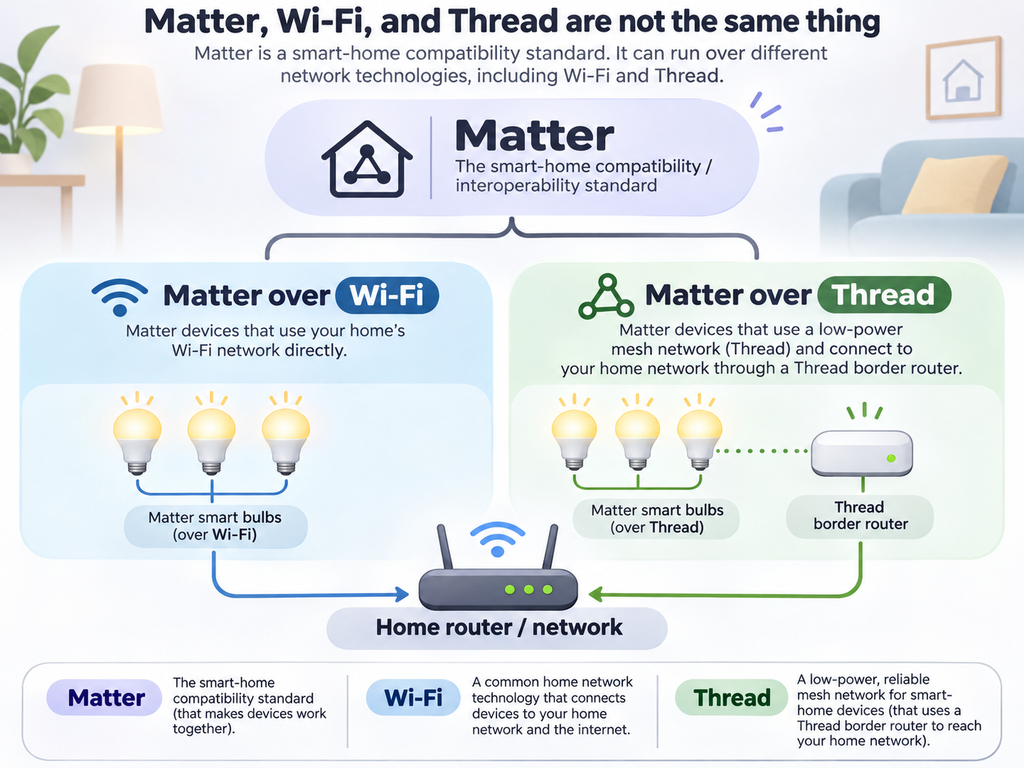
Matter vs. Wi-Fi vs. Thread: They Are Not the Same Thing
This is probably the most confusing part of smart-bulb shopping.
Matter is a smart-home interoperability standard. It is meant to make compatible devices easier to add and control across major smart-home platforms.
According to the Connectivity Standards Alliance, Matter devices can communicate over technologies including Wi-Fi, Thread and Ethernet.
So when a box says Matter, that does not tell you whether the bulb itself connects over Wi-Fi or Thread.
Think of it this way:
- Matter helps devices and smart-home platforms understand one another.
- Wi-Fi is one possible network connection the device can use.
- Thread is another network technology designed specifically for connected devices.
That distinction matters because the hardware you need can be different.
Matter Does Not Automatically Mean “No Hub Required”
A Matter logo is useful, but it is not magic.
If a Matter bulb communicates over Thread, you generally need a Thread border router somewhere in the home. Google describes the border router as the device that connects Thread devices into the rest of your home network, and Apple likewise notes that Thread-based accessories require a compatible Thread-enabled home hub or border router for full home use.
That border-router function may already be built into something you own, such as certain smart speakers, displays, streaming boxes or routers. But you should check before buying a Thread bulb rather than assuming the bulb will work by itself.
Matter-over-Wi-Fi products do not need a Thread border router, but they still need the appropriate smart-home controller or platform setup for the ecosystem you intend to use.
Wi-Fi Smart Bulbs: Usually the Simplest Starting Point
Wi-Fi bulbs connect directly to your home wireless network instead of requiring a dedicated lighting bridge.
That can make them attractive when you only want a few smart bulbs. Setup is usually straightforward: screw in the bulb, add it through the manufacturer’s app or a Matter-compatible smart-home app, and connect it to your network.
One detail is worth checking carefully: many Wi-Fi smart bulbs still use 2.4 GHz Wi-Fi. For example, TP-Link’s current Kasa setup documentation says its smart bulbs require a 2.4 GHz Wi-Fi network and an always-on power supply.
If your router combines 2.4 GHz and 5 GHz under one network name, setup may still be easy—but it is worth knowing the bulb’s requirement before assuming a connection problem means the bulb is defective.
Thread Smart Bulbs: Built for a Smart-Home Mesh
Thread was designed specifically for connected devices and creates a low-power mesh network in which compatible devices can help extend the network.
Google lists several advantages of Thread, including speed, reliability, range and efficiency, and notes that the mesh can reroute communication if one route becomes unavailable.
For a larger smart home, that can be appealing. But the key shopping question remains: Do you already have a Thread border router?
If not, a Thread bulb may turn a seemingly simple purchase into another piece of hardware you need to add.
What About Bulbs That Use a Bridge or Hub?
Some smart-lighting systems use technologies such as Zigbee and rely on a dedicated bridge.
That sounds less convenient than “no hub required,” but a bridge is not automatically a disadvantage.
A dedicated lighting bridge can keep dozens of bulbs off your regular Wi-Fi network, provide reliable local communication and unlock features specific to that lighting ecosystem.
Matter also supports bridges that allow devices using technologies such as Zigbee to participate in a Matter ecosystem. In other words, an established bridge-based system can still fit into a modern Matter home.
| Type | What It Uses | Best Fit | Watch For |
|---|---|---|---|
| Wi-Fi smart bulb | Your home Wi-Fi | A few bulbs, simple setup | Often 2.4 GHz; each bulb joins Wi-Fi |
| Matter over Wi-Fi | Wi-Fi + Matter | Cross-platform compatibility without Thread | Still needs compatible platform/controller setup |
| Matter over Thread | Thread + Matter | Modern mesh-based smart homes | Requires a Thread border router |
| Bridge-based lighting | Often Zigbee to a dedicated bridge | Larger lighting systems and advanced features | Requires the bridge, but may scale very well |
Does Matter Mean the Bulb Works With Everything?
Matter is designed to improve interoperability among smart-home platforms, and its multi-admin feature can allow one Matter device to be shared across multiple platforms.
That is a major improvement if one person in the house uses Apple Home while another prefers Google Home or Alexa.
But there is still an important caveat: basic Matter compatibility and manufacturer-specific features are not always the same thing.
A bulb may expose everyday controls such as on/off, brightness and color through Matter while its own app provides extra scenes, effects, firmware settings or special automations.
If a particular effect or feature is the reason you are buying the bulb, verify that the feature works in the app or ecosystem you actually plan to use.
How Bright Should a Smart Bulb Be?
Ignore watts when comparing brightness. Look at lumens.
Watts tell you how much electricity a bulb uses. Lumens tell you how much visible light it produces.
As a useful reference point, around 800 lumens is commonly used for a traditional 60-watt-equivalent bulb. Around 1,100 lumens corresponds roughly to a 75-watt incandescent equivalent, while about 1,600 lumens is in the 100-watt-equivalent range.
If a smart bulb is replacing the main bulb in a ceiling fixture, maximum brightness may matter much more than it would in a decorative bedside lamp.
A bulb that can produce millions of colors but tops out at a disappointing brightness may still feel like the wrong purchase in everyday white-light use.
White, Tunable White or Full Color?
There are three broad choices.
White-only
These bulbs generally produce one shade of white and allow smart on/off and dimming. They are often the least expensive choice.
Tunable white
These let you move between warmer and cooler shades of white. This can be more useful day to day than full RGB color.
ENERGY STAR notes that warmer incandescent-like light is commonly around 2200–3000K, while 3500–4100K appears whiter and 5000–6500K produces a cooler or bluer daylight-like appearance.
Full color / RGB
These add saturated colors in addition to adjustable white light. They are useful for entertainment rooms, holiday scenes, gaming setups, accent lighting and anyone who genuinely enjoys changing the look of a room.
But if you never plan to turn your living room purple, paying extra for millions of colors may not buy you anything useful.
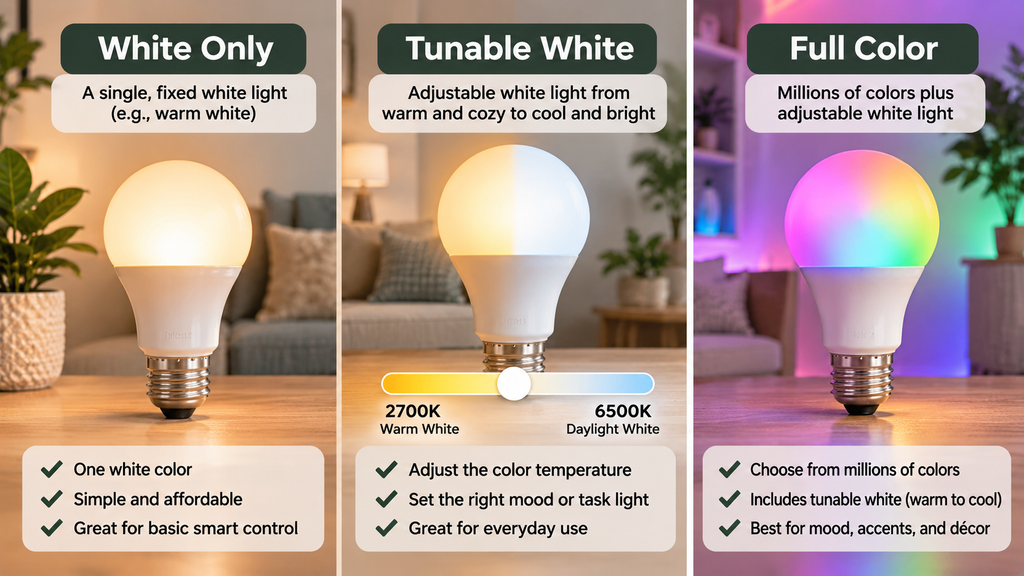
[IMAGE 2: Three-way visual comparing white-only, tunable white and full-color smart bulbs, with warm-to-cool white examples and RGB color examples.]
Smart Bulbs Need the Wall Switch Left On
This catches a lot of first-time buyers.
A smart bulb can only respond to an app, automation or voice command while it has power. If someone flips the ordinary wall switch off, the bulb is no longer powered and becomes unreachable.
That means smart bulbs work best when everyone in the house understands that the physical switch usually stays on.
Some smart-lighting systems solve this with wireless remotes or in-wall modules that let the wall control send smart commands without actually cutting power to the bulbs.
If your household constantly uses the wall switch out of habit, a smart switch controlling normal bulbs may sometimes make more sense than putting smart bulbs in every socket.
Be Careful With Traditional Dimmer Switches
Smart bulbs usually handle dimming internally through software.
That means a standard wall dimmer can cause problems unless the bulb specifically says it is compatible with that type of dimmer. TP-Link, for example, specifies that some of its Kasa smart bulbs are compatible with regular light switches but should not be used with standard dimmers.
If your fixture is already on a wall dimmer, check the bulb manufacturer’s instructions before buying.
Don’t Forget the Physical Bulb
A smart bulb can have perfect software compatibility and still be useless if it does not fit your fixture.
- Base: E26 is common in U.S. household lamps, but not universal.
- Shape: A19, BR30, GU10 and candle-style bulbs serve different fixtures.
- Diameter and length: smart bulbs can be larger than standard bulbs because the electronics are inside the housing.
- Enclosed fixtures: check whether the bulb is rated for use in a fully enclosed fixture.
- Indoor/outdoor rating: don’t assume an indoor smart bulb is suitable for a porch or damp environment.
What to Look for Before Buying a Smart Bulb
- Confirm the socket, shape and physical size. Make sure it actually fits the fixture.
- Check the maximum lumens. Buy enough brightness for the bulb’s real job.
- Decide whether you need color. White-only, tunable white and full RGB solve different problems.
- Identify the connection type. Wi-Fi, Thread and bridge-based bulbs have different infrastructure needs.
- Don’t confuse Matter with Thread. Matter is the compatibility standard; Thread is one way a Matter device can connect.
- If it uses Thread, confirm you own a Thread border router.
- If it uses Wi-Fi, check whether it requires 2.4 GHz.
- Verify your preferred ecosystem. Apple Home, Google Home, Alexa and SmartThings support overlaps, but advanced features can vary.
- Check the wall switch and dimmer situation. The bulb needs constant power, and a standard dimmer may not be compatible.
- Compare the app as well as the bulb. Scenes, schedules and special effects often live in the manufacturer’s app.
So Which Type of Smart Bulb Should You Buy?
If you only want one or two inexpensive smart bulbs and do not already have a smart-home system, a straightforward Wi-Fi bulb can be the lowest-friction place to start.
If you want devices that can live across multiple smart-home ecosystems, look seriously at Matter-certified options—but still check whether the bulb uses Wi-Fi or Thread.
If you already own a Thread border router and are building a larger modern smart home, Matter-over-Thread can be an attractive option.
If you expect to install many lights and care about advanced lighting scenes, accessories and reliability, a mature bridge-based lighting system may still be worth the extra box.
And if everyone in your house is going to keep turning the wall switch off anyway, consider whether a smart switch with ordinary bulbs would solve the problem better.
The best smart bulb is not necessarily the one with the longest feature list.
It’s the one that fits your fixture, your network, your smart-home ecosystem and the way people in your house actually use the light.
That’s worth one more search before you buy.
Frequently Asked Questions
Is Matter the same thing as Thread?
No. Matter is a smart-home interoperability standard. Thread is a network technology that some Matter devices use to communicate. Matter devices can also communicate over Wi-Fi and Ethernet.
Do Matter smart bulbs need a hub?
It depends on the bulb and your smart-home platform. Matter-over-Thread bulbs require access to a Thread border router. Matter-over-Wi-Fi bulbs do not need a Thread border router, but your ecosystem still needs the appropriate Matter controller or home-hub setup.
Do smart bulbs work if the wall switch is off?
No. A smart bulb needs electrical power to stay connected and respond to apps, automations and voice commands. Turning off the normal wall switch cuts power to the bulb.
Do I need a color-changing smart bulb?
Not necessarily. Tunable-white bulbs can provide warm evening light and cooler daytime light without the added cost of full RGB color. Buy full-color bulbs when you actually want colored scenes or accent lighting.
How many lumens should a smart bulb have?
Around 800 lumens is a useful benchmark for replacing a traditional 60-watt incandescent bulb. For brighter task lighting or larger spaces, look toward roughly 1,100 or 1,600 lumens depending on the fixture and room.